Wednesday, 25 November 2009

Ident 2 Samurai


This is my second ident and felt it played smoothly. The doors worked nicely as they revealed something else to the audience. I had difficulty rendering this file for some unknown reason when I played it back in quick time it would freeze when ever I played it more then twice. I tried rendering it again but the same problem happened , maybe there is a problem with the file. However when I rendered it in the you tube video format it worked fine but this resulted in a lower quality.

The quality of this particular video looked far higher in after effects and Premier.
Once again learning video formats well is essential and I have learnt a lot from rendering so many films

Samurai Ident

I wanted to each of my Idents to be different yet follow a similar style. This one was influenced by my interest in Japan . The samurai is the main focus of this Ident, being iconic to Japan I thought it was well suited. The British Museum also has a Japanese section.
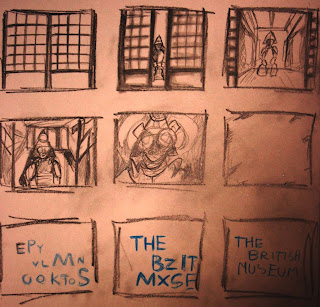
I started of by sketching a storyboard. I wanted the door's to slide back to reveal a Japanese setting . The camera would then zoom in to the Samurai, his eyes would glow white and the the font would appear.
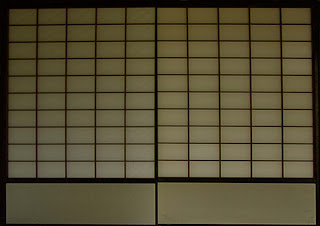
This was my first layer in photoshop I had to layer them separately so that I could animate them separately in after effects.
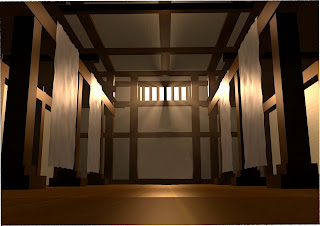
This is the image before I edited it.
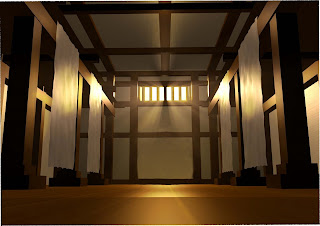
I then highlighted the areas of light to make it look more dramatic.
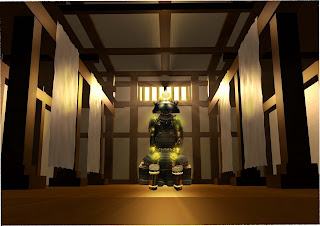
Finlay I placed the Samurai inside and highlighted him also I added the glow effect in After effects. The samurai was taken from my own photograhs, which helped as the resolution was high, i searched on google but could find any which were high res or at the desired angle.

Creative Process

  • Used images and layered them on photoshop
  • seperated the layers so that I could animate them in After Effects.
  • Highlighted select parts or my layers to look good
After Effects

  • Positioned the Anchor point so I could move the doors from a certain area.
  • Keyed the doors until the movement looked smoothe
  • used the graph editor to create the right motion
  • used the scale tool to give the illusion the samurai was coming closer
  • changed the opacity so level lit up as the doors openend
  • created fast blur so the doors looked more realistic as they opened
  • placed blur onto samurai so that he did not look to sharp when the doors opened
  • placed blur on to background so the Samuari stood out as I zoomed in
  • added glow effect to the samurai eyes
  • placed white out so it appeared as if the eyes lite up the whole room
  • used present typography
  • duration 5 seconds

Premier

  • used soundtrack
  • used Sound effect from uni hard drive
  • placed sound effect on Dore
  • rendered to desired format
  • duration 5 seconds
I had trouble with the image quality for some reason it looked better in after effects to when i rendered it out as a movie file.

I also was realizing the importance of tidy file management, as I would end up having some many video files which were slightly different I may have changed them due to their poor quality or general changes . In future projects I will create a separate folder for test files. This would make my work space allot more manageable

Aztec mask (creative process)

I had never used after effects before, but used various websites such as creative cow and videocoplitot which had many tutorials to aid me through. I also listened to advice from my tutors who felt the mask idea was strong and realistic due to the time we were given.

After finishing in After Effects I took it in to premier to add the sound. The project also gave me a chance to play around with render settings, general effects and file management.

It took a while to get the desired look I was after and i think the music added greatly to creating atmosphere.

After effects
  • Key framed panning
  • masked the eyes so they would open
  • opacity mask fade in
  • glow effect - mask becomes bright
  • opacity mask fades in as eyes open
  • minmax mosaic style effect as mask blurs to background
  • desired font to animate
  • chose font to mimic the British museum
  • render to movie
  • Duration 10 seconds
Premier

  • select music
  • black out effect at the end of ident
  • render into desired format
  • Duration 10 seconds
I spent hours watching tutorials then following them from VideoCopilot.com this gave me a basic understanding of After Effects. I used the ten basic tutorials on the website. It was essential that I watched these as I quickly realized I knew very little about After Effects.

For future refference I believe it is essential to study the tutorials as part of my research. As I did not take in to account the amount of hours which I would be spent learning the software. This prevented me from getting on with what I wanted to do , getting on with the Idents. As a result of this I will continue to study the programmes in my own time so that for future projects it will be easier to get on with my work.

Aztec Ident (Complete)


I was pleased with the overall outcome of this Ident , it is very atmospheric and I believe it has a lot of impact. If I was going to make an improvement I change the typeface to something more creative , rather then using a standard pre-set. I was not confident in spending time animating my own font but this is another skill I have to learn for the future.

Ident 1 Aztec Mask

I looked back over my original research into Idents and watched Apocalypto , which is a film about Mayan culture, Although my mask is Aztec in origin both cultures are similar therefore the film is very relevant to my ident.

Go back to my research into to Idents to view these videos.

This image was for the idea where the audience would travel through the eye of the mask to be transported in to a mayan / Aztec world.


These two images are also from the film Apocalypto , and reveal ancient Mayan life and culture.

I worked all day to color and draw this mask. I worked by using a drawing tablet , I worked with various layers until the mask began to look 3.D. I worked free hand and the mask is not perfectly symmetrical but I feel this is suited to a mask which would have been carved.


I then highlighted certain parts of the mask to mimic the mosaic effect of the original mask. It also gave the mask a mystical quality.

I then used the original mask and merged it with my own , this gave it a realistic texture. The texture vastly improved the overall look. I could have used the photo but I think combining digital art with a texture made the mask stand out.

This was the completed photoshop image . It was now ready to take into after effects. Often with my ideas I have a general idea how I want my Ident to look and feel, I then work demonstrating the creative steps. I wanted the background to be black as I imagine the mask to be faint and the clear as it comes closer to the screen.

Z Brush ?

My tutor advised me that the Aztec mask Ident may look good in three D . I tried to use Z brush but found it to time consuming . Since I was unfamiliar with the software it took a while to get the basics, I watched tutorials to gain a basic understanding. I spent along time getting to grips with the software and produced quite a detailed model of a mask, but it was to time consuming. In the end I decided to scrap Z brush and go back to photoshop. I dont think it will be a problem if the mask is not 3D, as Idents are not always 3D models.

I Also realized at this point, being quite a way in to my project that tutorials are a vital part of learning and I feel that I overlooked how useful they are.

I will however in the future go back to Z brush to help out with 3.D projects.

Developing Aztec idea


I wanted to develop this idea, and used photo shop to flesh it out. By doing this I hoped to gain a clearer vision of what my final out come may look like

I researched a number of Aztec and Mayan masks to gain inspiration , I also wanted to select one to base my Ident on.


I decided to use the mask above as my main source, the design is simple which will help save time and it is also featured at the British Museum at present. Some of the more elobate masks look more impresive , but I have to be practical and think about time. The mask above depicts the last of the Aztec rulers before colonization.


This is my first rough photoshop image , it gave some idea how my ident may look. I used my drawing tablet and wanted to get a rough idea.


Using an image from Google, I decided to merge it with my mask. This was to add to the effect that the mask was coming alive as I previously explained in my concept for this Ident. I am not sure yet how I am going to animate the eye, to make it look like ist openeing. The only problem I had with the photoshop drawing was the lack of texture I will come back to this later.